Developmental Insights

An added feature to brightwheel, a childcare management software

Overview

Role

Product Designer (UI/UX)

Timeline

9 weeks (80+ hours)

Tools

Figma

This project is a fictitious scenario, completed as a part of Designlab's UX Academy.

Background

For this project, I was tasked with designing a new feature for an existing product. I selected Brightwheel because of my familiarity with the platform as a Montessori educator and because I saw an opportunity to improve how developmental information is shared with families.

The feature delivers personalized developmental observations directly to parents, helping them understand what their child is learning and why it matters. Each insight includes developmental context and suggestions for extending learning at home.

Because this was an enhancement to an existing product, I worked within Brightwheel's visual language, navigation patterns, and user expectations. My goal was to create a feature that felt like a natural extension of the current experience.

How My Montessori Background Shaped the Problem Space

Having spent years observing children and communicating developmental progress to families, I understood firsthand the challenges teachers face when sharing meaningful information in a concise way.

Through conferences, daily conversations, and parent questions, I noticed that families often wanted more context around their child's development rather than simple updates about their day.

The Opportunity: Strengthening Parent Engagement Through Developmental Insights

Brightwheel excels at sharing photos, messages, and classroom updates, but there was an opportunity to help parents better understand their child's developmental journey.

I wanted to understand how parents learn about milestones today and whether existing communication methods were meeting their needs.

My hypothesis was that providing developmental context and actionable next steps could create more meaningful engagement between home and school.

  • Research methodologies

  • Insights

  • Defining the feature

Overview

Understanding User Needs

Methodologies

I interviewed parents and teachers to learn about their communication habits, developmental concerns, and experiences receiving updates from schools and communicating with each other.

Participants discussed conferences, report cards, classroom apps, and informal conversations as their primary sources of developmental information.

Parents expressed a desire for more proactive communication and wanted insights that helped them better support learning at home.

During the early research phase, I compared Seesaw, Remind, and Brightwheel to understand how existing platforms communicate children’s activities and development to families. Although I initially planned to design the feature for a different education app, the analysis revealed that Brightwheel was better aligned with the concept because it serves younger children and prioritizes frequent communication between educators and families. My previous experience using Brightwheel also gave me valuable insight into its users and workflows. Based on these findings, I chose Brightwheel as the platform for the final feature while retaining it in the competitive analysis to document how that decision emerged from the research.

Insights

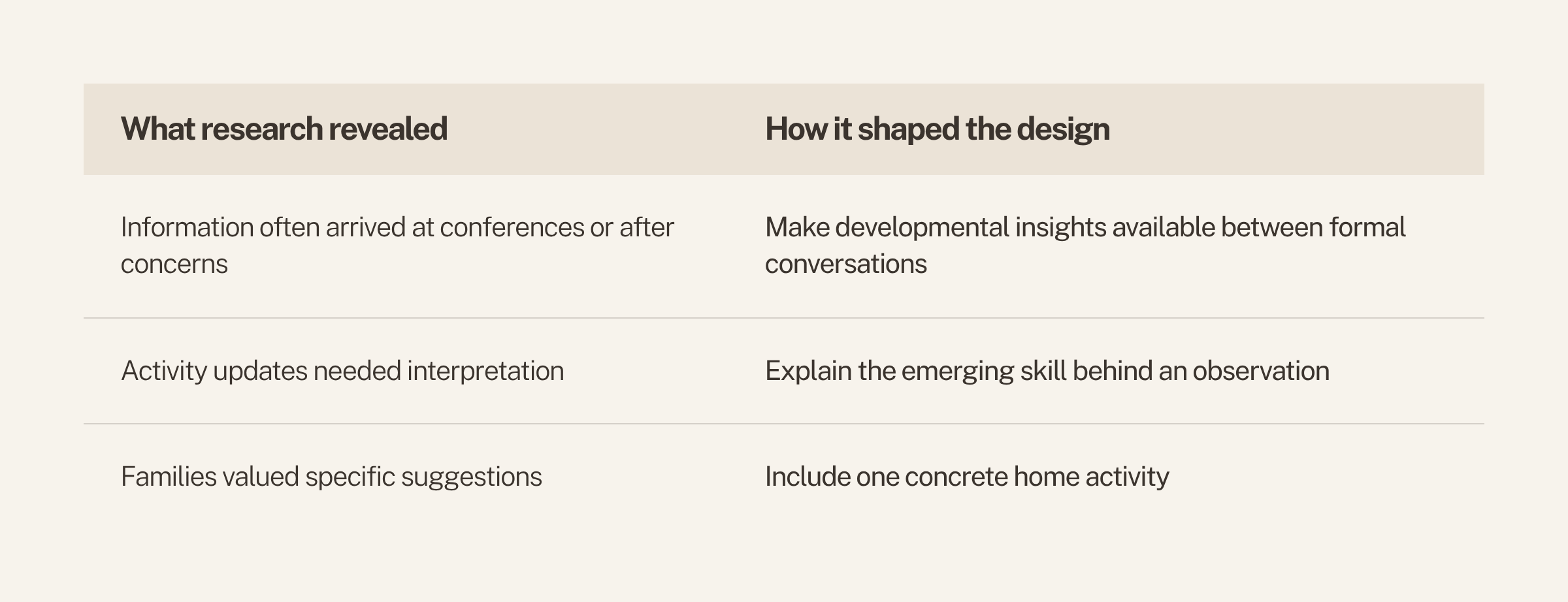
Many participants reported only receiving developmental information when a concern arose or during scheduled conferences.

While parents appreciated updates about classroom activities, they were more interested in understanding what those activities meant for their child's growth.

Families appreciated when teachers provided specific suggestions that connected classroom learning to activities they could do together outside of school.

Defining the Developmental Insights Feature

The feature allows teachers to share meaningful observations that highlight emerging skills, interests, and developmental progress.

Each insight explains why an observation matters and how it relates to broader developmental goals.

To help bridge the gap between school and home, every insight includes a simple activity parents can try with their child.

  • Persona development

  • Affinity mapping

Overview

Establishing User Pain Points

Persona Development

Professional profile of Sarah Martinez, a 38-year-old marketing manager, with a photo of her wearing a white blazer and smiling, hand on her waist, against a beige background, and a detailed description of her goals, motivations, needs, and challenges related to her child's development.
A professional profile for Emily Chen, a 34-year-old early childhood educator with 10 years of experience in teaching preschool and kindergarten. The profile includes a portrait of a woman with black hair that has green tips, wearing glasses and a red and black checkered shirt, smiling in a classroom setting. The profile details her goals, motivations, needs, and challenges related to supporting children's development and family engagement.

I developed personas representing busy parents who want to stay involved in their child's education but have limited time and attention, as well as early childhood educators who want to partner with parents.

These personas helped clarify key user needs, including understanding developmental progress, feeling connected to teachers, and supporting learning at home.

Affinity Mapping

A digital whiteboard with six sections of sticky notes on topics related to parent emotions, connections between home and school, what parents should know, products and communication preferences of teachers, and parents' preferences for communication. The notes are color-coded with blue, yellow, pink, gray, and orange sticky notes, containing various comments and observations.

I organized interview findings into an affinity map to uncover patterns across participants. This process revealed recurring themes around communication, developmental visibility, trust, and parent involvement, helping prioritize the features that would provide the most value. These insights became the foundation for the Developmental Insights feature set.

  • User flows

  • Exploring solutions & early concepts

Overview

Creating the Framework

User Flows

Flowchart diagram divided into three columns showing steps for gaining developmental insight through parent reactions and activities, with blue rectangles indicating specific actions, and orange circles representing notifications and evaluations.

From my research findings, I created user flows to visualize how parents would discover, engage with, save, and revisit developmental insights.

Exploring Solutions & Early Concepts

I explored several concepts, including visual interest maps, developmental timelines, teacher notes, and personalized insight notifications.

Ideas were assessed based on their ability to increase engagement while remaining practical for teachers to use.

Research consistently showed that parents preferred concise, actionable information over complex developmental reports.

  • Wireframes

  • Designing for brighwheel’s ecosystem

Overview

Let’s Start Designing!

Early wireframes focused on determining how much information parents needed and how it should be presented.

I mapped the complete experience from receiving a notification to reviewing an insight and engaging with the content.

Several rounds of revisions improved clarity, reduced cognitive load, and streamlined user interactions.

Wireframes

Mobile app screen displaying a developmental insight about children's interest in art and drawing, with an empty drawing area, dropdown menu, notes, and buttons for saving and viewing activities.
Mobil app screen titled "Developmental Insight" with section "Growing Interest in Art & Drawing," showing a message about a child's drawing activities, a teacher note, and buttons for saving, viewing activity, and reactions.
Screenshot of a mobile app interface for a home activity called Nature Drawing Hunt, showing a pop-up confirmation marked as tried, with options to view activities, save activity, mark as tried, and return to insight.
Instructions for a nature drawing hunt activity, listing materials (paper, crayons, leaves or flowers), steps (collect leaves, observe shapes and colors, draw), and a note about developmental connections to observation skills and creativity. Options to save activity or mark as tried, with a return button.

Designing for brightwheel’s Existing Ecosystem

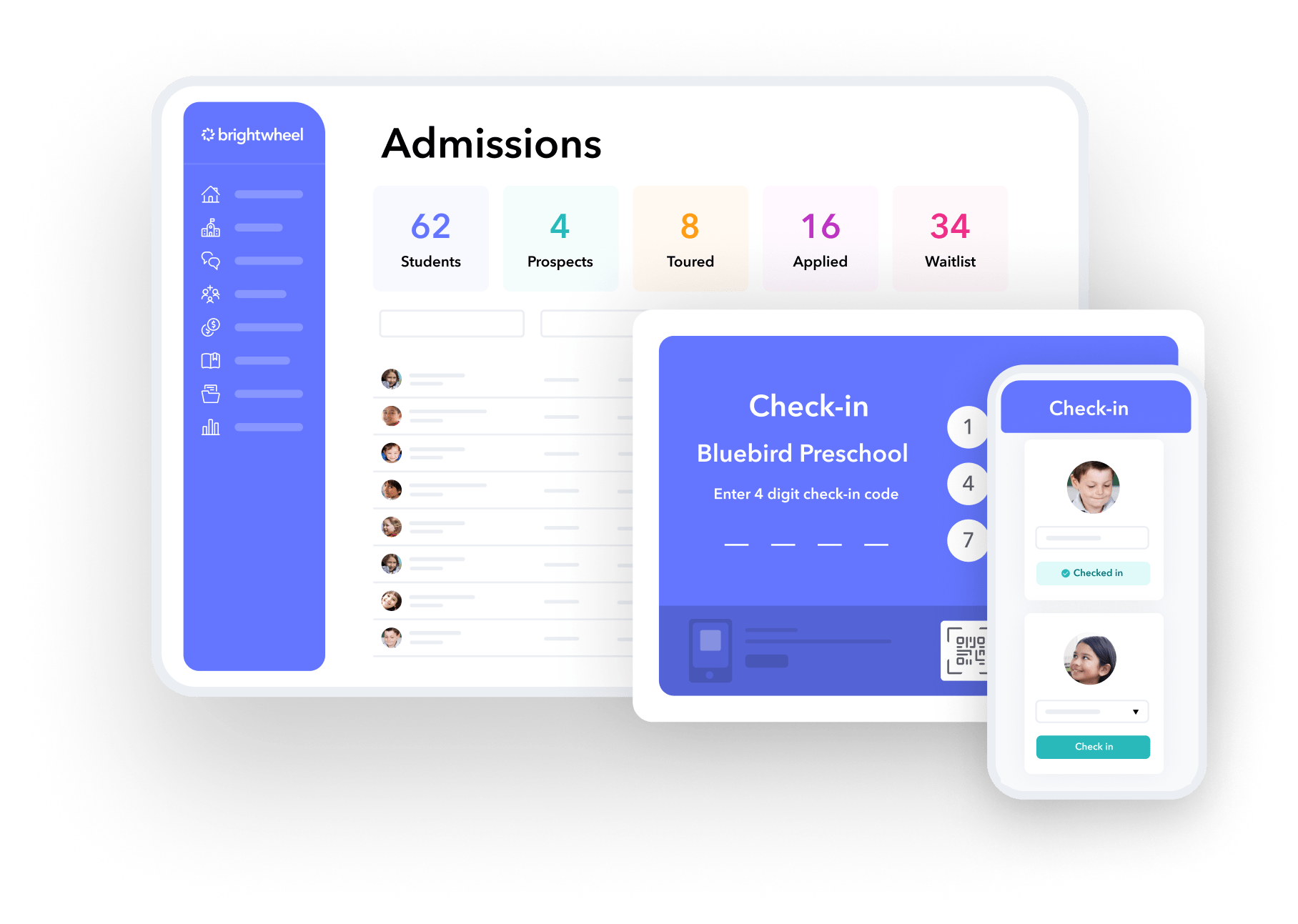
Screenshot of a school admissions management dashboard and a mobile check-in app interface. The dashboard displays student statistics and a list of student profiles. The check-in app shows a photo and details of a child from Bluebird Preschool, with a QR code for scanning.

I incorporated familiar UI patterns and design elements to create a seamless experience.

The feature was designed to complement existing communication tools rather than compete with them.

Parents could react, save, and respond to insights using interaction patterns already common throughout the app.

  • Usability test findings

  • Iterations

Overview

Usability Testing

Usability Test Findings

Participants completed tasks such as reviewing an insight, saving it, contacting a teacher, and exploring suggested activities.

Testing revealed which elements felt intuitive and which areas created confusion.

One of the most important findings was that users interpreted saved insights differently from developmental progress tracking.

Iterating on Saved Insights & Growth Tracking

Participants assumed saved insights would function as a library of memorable moments rather than a data visualization tool.

I separated these concepts into two distinct features with different purposes and navigation paths.

This adjustment aligned the product more closely with user expectations and improved overall usability.

  • Final design

  • Impact & business value

  • Reflection & next steps

Overview

Final Solution

Final Design

Parents receive a notification when a new developmental insight becomes available and can immediately review the information.

The final feature encourages engagement while providing valuable developmental context.

Parents can view patterns and growth across multiple developmental domains, creating a more holistic understanding of their child's learning journey.

Screen displaying a home activity called 'Nature Drawing Hunt' with instructions for collecting natural materials like leaves and flowers, observing shapes and colors, and drawing objects to strengthen observation skills, language, fine motor control, and creativity.
Mobile phone screen displaying a home activity titled 'Nature Drawing Hunt' with instructions and materials, featuring a table with leaves and drawing papers for a nature-themed craft activity.
Mobile app screen showing a completed home activity called 'Nature Drawing Hunt' with an overlay message stating 'Marked as Completed' and a blue button labeled 'View Completed Activities'.
Smartphone screen showing a 'Home Activity' app with a completed activity notification and instruction details underneath.
A child drawing and coloring with crayons and colored pencils on paper, surrounded by art supplies, during a developmental activity focused on art and drawing.
A child drawing and coloring on a piece of paper with colored pencils, with a pink bookmark icon, text about developmental insight and art activities, and buttons for trying activities at home and viewing growth journey.
Child coloring a house with crayons on a piece of paper, surrounded by colored markers and a pencil case.
Child coloring a drawing of a house with crayons on paper, surrounded by colored pencils and a pink pencil case.
Screenshot of a webpage titled 'Growth Journey' for Spring 2026, summarizing developmental patterns across four categories: Art & Creativity, Language Development, Movement & Coordination, and Math. Each category lists current strengths and growing skills, with a teacher comment at the bottom.
Screenshot of a digital app showing saved educational insights for Spring 2026, including topics on art, math, language, and quantity with thumbnails of children engaging in related activities.
Screenshot of a mobile app displaying saved insights for Spring 2026, featuring images of children engaging in art activities.
Mobile screen displaying a 'Growth Journey' app with sections on Spring 2026, Art & Creativity, and Language Development, detailing developmental patterns, strengths, and skills.

The prototype demonstrates the complete user experience and key interactions.

Users can move through realistic scenarios, including reviewing insights, saving content, and communicating with teachers.

The prototype served as a tool for validating design decisions and communicating the concept.

Impact & Business Value

The feature encourages parents to interact more frequently with developmental content and teacher communication.

Providing context and home activities creates continuity between classroom learning and family involvement.

By delivering more meaningful value to families, the feature has the potential to increase satisfaction and long-term platform engagement.

Reflection & Next Steps

My background in Montessori education provided unique insights that informed both the problem and the solution.

Future iterations could include teacher approval workflows, insight management tools, and automated recommendations.

These opportunities could further personalize the experience and increase long-term engagement.